
Skip to content
Skip to content
Menu
Alchemex
  • Products
    • Sage Intelligence Reporting
      • Enrolment
    • Velixo
  • Services
    • Consulting
    • Training
    • Development
  • Support
    • Support Overview
    • Create Support Ticket
    • Book A Session
    • Knowledgebase
  • About
    • About Us
  • Contact
Alchemex

How to calculate the average of the top 5 values

By admin on June 5, 2018April 19, 2019

Let’s say you have a workbook containing sales over a two year period. You would now like to know what the average is for your top 5 sales values, as well as the value for your largest sale.

In our example, which you are welcome to download here, we are using Column A for the Year, B for the Month and C for the Sales values.

1. To calculate the average of the top 5 sales values, we can use the AVERAGE and LARGE functions: =AVERAGE(LARGE(C2:C27,{1,2,3,4,5}))

2. The LARGE function returns an array of the top 5 sales values.  The AVERAGE function then takes that total and returns the average of those 5 sales values.

3. To return the value of the nth largest sales, use the LARGE function on its own.  If you want the largest sales value, then you would use a 1 in the formula, the second largest value would use a 2, etc. =LARGE(C:C,1)
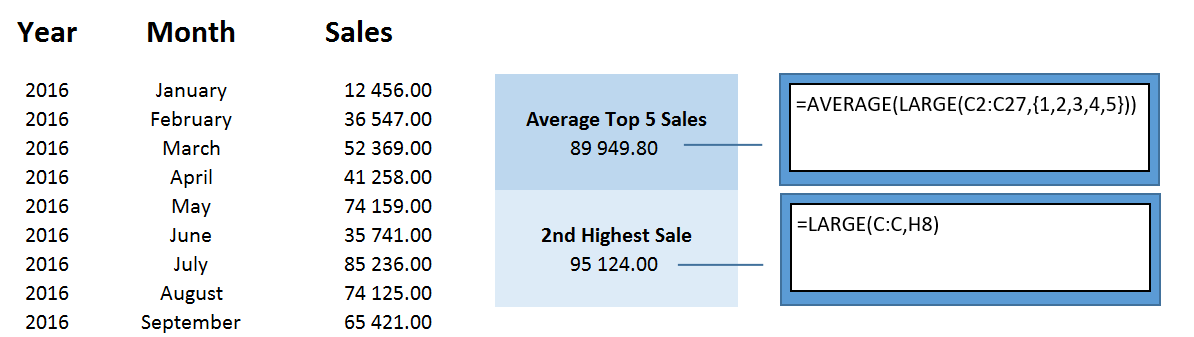
The above image quickly and efficiently summarises these formulas, and allows you to be more effective when working in Excel.

The post How to calculate the average of the top 5 values appeared first on Sage Intelligence.

Source: Excel on Steroids

Post navigation

How to reduce the size of a workbook using a single formula
How to keep your Report Manager tidy by hiding reports you don’t use

Leave a Reply Cancel reply

Your email address will not be published. Required fields are marked *

Recent Posts

  • Why Working In Excel Works
  • Alchemex Welcomes Velixo 6 For MYOB Advanced
  • Welcome to Velixo Reports Version 4.2
  • Part 3 of 3: Learn how to create a Management Pack in Sage 50cloud Intelligence
  • Part 3 of 3: Create and customize reports easily with the Financial Report Designer

Search

Contact Us

Phone: +61 2 9890 2339
Email: sales@alchemex.com.au
Address: PO Box 212, Deaken West, Canberra, Australia, 2600
©2026 Alchemex | WordPress Theme by SuperbThemes.com