
Skip to content
Skip to content
Menu
Alchemex
  • Products
    • Sage Intelligence Reporting
      • Enrolment
    • Velixo
      • Enrolment
        • Velixo for Acumatica
        • Velixo for Sage Intacct
  • Services
    • Consulting
    • Training
    • Development
  • Support
    • Support Overview
    • Create Support Ticket
    • Book A Session
    • Knowledgebase
  • About
    • About Us
  • Contact
Alchemex

Learn the various Report Manager menu ribbon functions

By admin on August 14, 2018April 19, 2019

When you use the Sage Intelligence Report Manager module, you will see an array of icons on the menu ribbon.  Here is a quick tip on their functionality.
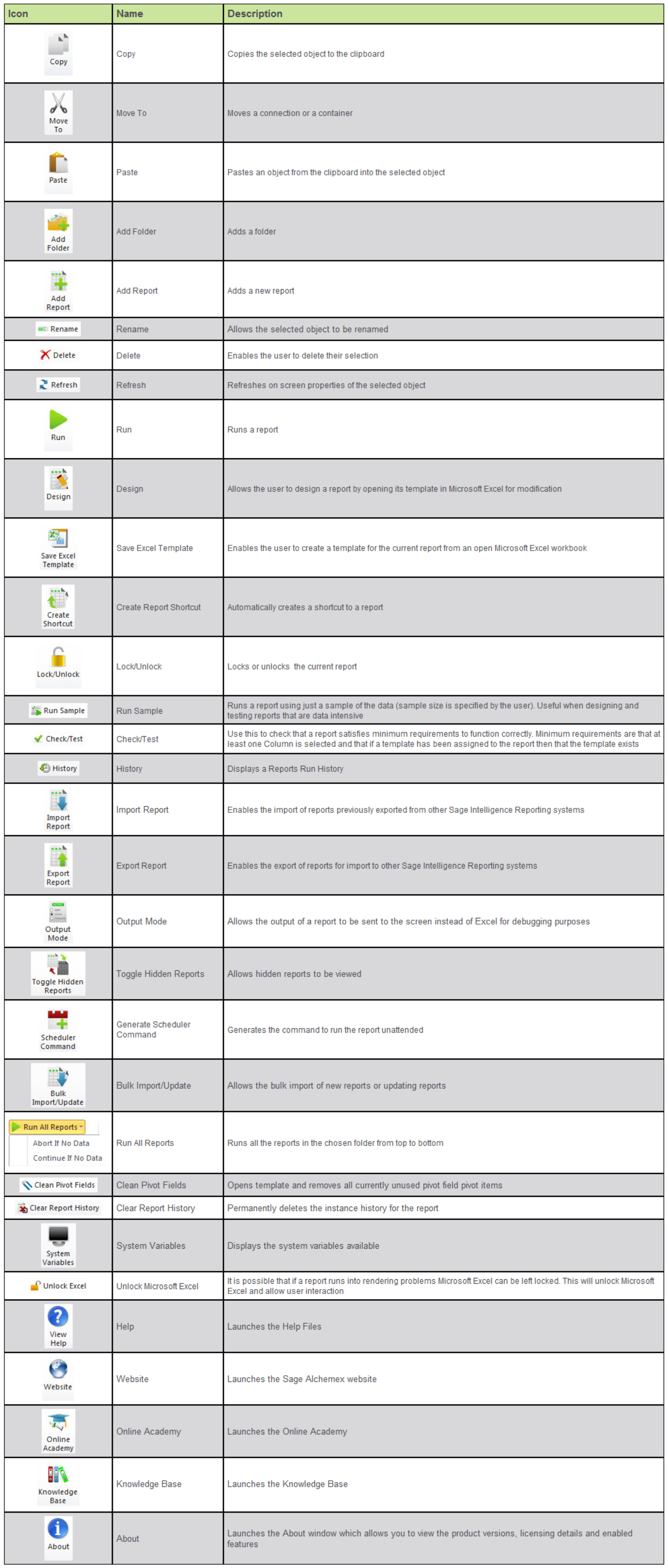
Take note that icons will activate / deactivate based on your selection in the object window.  These icons are available on software using Sage Intelligence Core 7.3 and above.

The post Learn the various Report Manager menu ribbon functions appeared first on Sage Intelligence.

Source: Sage Intelligence

Post navigation

How to add a variance and running total in a Pivot Table
How to create a linked dashboard (or landing page) for your Excel workbook

Leave a Reply Cancel reply

Your email address will not be published. Required fields are marked *

Recent Posts

  • Why Working In Excel Works
  • Alchemex Welcomes Velixo 6 For MYOB Advanced
  • Welcome to Velixo Reports Version 4.2
  • Part 3 of 3: Learn how to create a Management Pack in Sage 50cloud Intelligence
  • Part 3 of 3: Create and customize reports easily with the Financial Report Designer

Search

Contact Us

Phone: +61 2 9890 2339
Email: sales@alchemex.com.au
Address: PO Box 212, Deaken West, Canberra, Australia, 2600
©2025 Alchemex | WordPress Theme by SuperbThemes.com