
Skip to content
Skip to content
Menu
Alchemex
  • Products
    • Sage Intelligence Reporting
      • Enrolment
    • Velixo
  • Services
    • Consulting
    • Training
    • Development
  • Support
    • Support Overview
    • Create Support Ticket
    • Book A Session
    • Knowledgebase
  • About
    • About Us
  • Contact
Alchemex

Sage Intelligence troubleshooting tip

By admin on September 12, 2018April 19, 2019

Not grasping why your system is returning an unexpected result can be a source of great frustration. If you suspect there could potentially be an issue with Sage Intelligence, try this quick troubleshooting technique.

While Sage Intelligence is loaded on your screen, press F12 on your keyboard—this will open a console at the bottom or to the right of your screen.
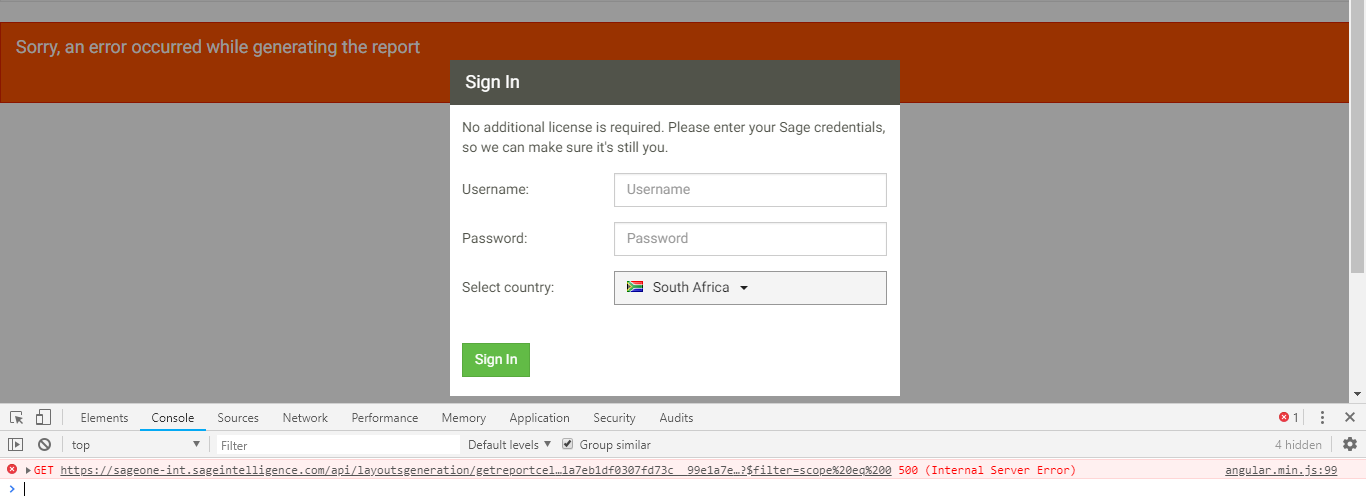
If there is an error on the webpage, you will see it highlighted in red under the Console tab.  Take a screenshot of this error and send it through to your local support team to help them assist you as quickly as possible.

The post Sage Intelligence troubleshooting tip appeared first on Sage Intelligence.

Source: Sage Intelligence

Post navigation

Learn the various Connector menu ribbon functions
Gain added flexibility by downloading your Sage Intelligence reports to Excel

Leave a Reply Cancel reply

Your email address will not be published. Required fields are marked *

Recent Posts

  • Why Working In Excel Works
  • Alchemex Welcomes Velixo 6 For MYOB Advanced
  • Welcome to Velixo Reports Version 4.2
  • Part 3 of 3: Learn how to create a Management Pack in Sage 50cloud Intelligence
  • Part 3 of 3: Create and customize reports easily with the Financial Report Designer

Search

Contact Us

Phone: +61 2 9890 2339
Email: sales@alchemex.com.au
Address: PO Box 212, Deaken West, Canberra, Australia, 2600
©2026 Alchemex | WordPress Theme by SuperbThemes.com